What should you look for in a personal alarm for seniors?
Choosing a personal medical alarm can feel overwhelming when every model promises something different. The best starting point is to compare three core areas: how the device connects for help, what kind of coverage it offers, and whether it suits the user's daily habits. These three factors will separate a unit that simply looks right from one that actually works when it matters.
How the alarm summons help
The most basic function of any personal alarm is to let the wearer call for assistance. But the way that call happens varies a lot. Older push-button pendants send a signal to a base unit that then dials a monitoring centre. Newer alarms use cellular networks and built-in microphones for two-way calling, meaning the wearer can speak directly to a responder without needing to reach a base station.
Look at whether the alarm relies on a landline, a cellular connection, or a mix of both. Landline-dependent units can be cheaper to run, but they stop working if the phone line goes down or if the wearer is out of range of the base unit. Cellular units keep working as long as there is mobile coverage, which makes them more flexible for someone who spends time in the garden, at the shops, or visiting family.
Another detail to consider is fall detection. Many modern alarms include an automatic fall sensor that triggers a call if the device detects a sudden impact followed by stillness. This feature can be vital for someone who lives alone or who has mobility issues, because it removes the need to press a button after a fall. But fall detection is not perfect. Some sensors are too sensitive and trigger false alarms, while others may miss a slow, controlled fall. If you are comparing alarms, ask whether the fall detection can be adjusted or turned off if it becomes a nuisance.
Coverage and range
Coverage matters in two ways: the range around the home and the range when away from it. Basic pendants only work within a certain distance from the base unit, often around 200 to 300 metres. That is fine for a small property or a flat, but it can be a problem if the person has a large garden, a multi-storey house, or a detached garage.

GPS-enabled alarms change this completely. They use satellite positioning to locate the wearer anywhere, so help can be sent to the right place whether the person is at the local park, on a bus, or visiting a friend. For someone who is still active and goes out independently, a GPS model offers peace of mind that a short-range pendant cannot match.
Battery life is part of this conversation too. GPS alarms tend to need recharging every day or two because they constantly communicate with satellites and cellular networks. Pendants that only communicate when the button is pressed can last weeks or months on a single charge. Think about whether the user will remember to charge a device every night, or whether a longer-lasting battery is a better fit.
Ease of use for the senior
A personal alarm is useless if the wearer finds it uncomfortable, confusing, or embarrassing to wear. The physical design matters a lot. Some alarms are pendants worn around the neck, others clip onto a belt or wristband, and a few are designed to be worn as a watch. Neck pendants are the most common and the easiest to press in an emergency, but some people find them uncomfortable or worry about them catching on things. Wristbands are less likely to be left in a drawer, but the button can be harder to press for someone with arthritis.
Water resistance is another practical point. Many falls happen in the bathroom, so the alarm needs to survive a shower or a splash. Check the water resistance rating. Some pendants are waterproof enough to wear in the shower, while others are only splash-proof. If the alarm cannot get wet, the wearer will have to remember to take it off before bathing, which defeats the purpose.
Ease of charging or replacing batteries is also worth comparing. A device that needs a proprietary charger and a fiddly connection may frustrate someone with limited dexterity. Models with simple magnetic chargers or long-life disposable batteries tend to be easier for seniors to manage on their own.
Monthly fees and contracts
The cost of a personal alarm does not stop with the price of the device. Many services charge a monthly monitoring fee that covers the call centre and the cellular data. Some require a 12-month or 24-month contract, while others are pay-as-you-go or have no lock-in. Compare the total cost over a couple of years, not just the upfront price. A cheap unit with a high monthly fee can end up costing more than a premium model with no ongoing charges.
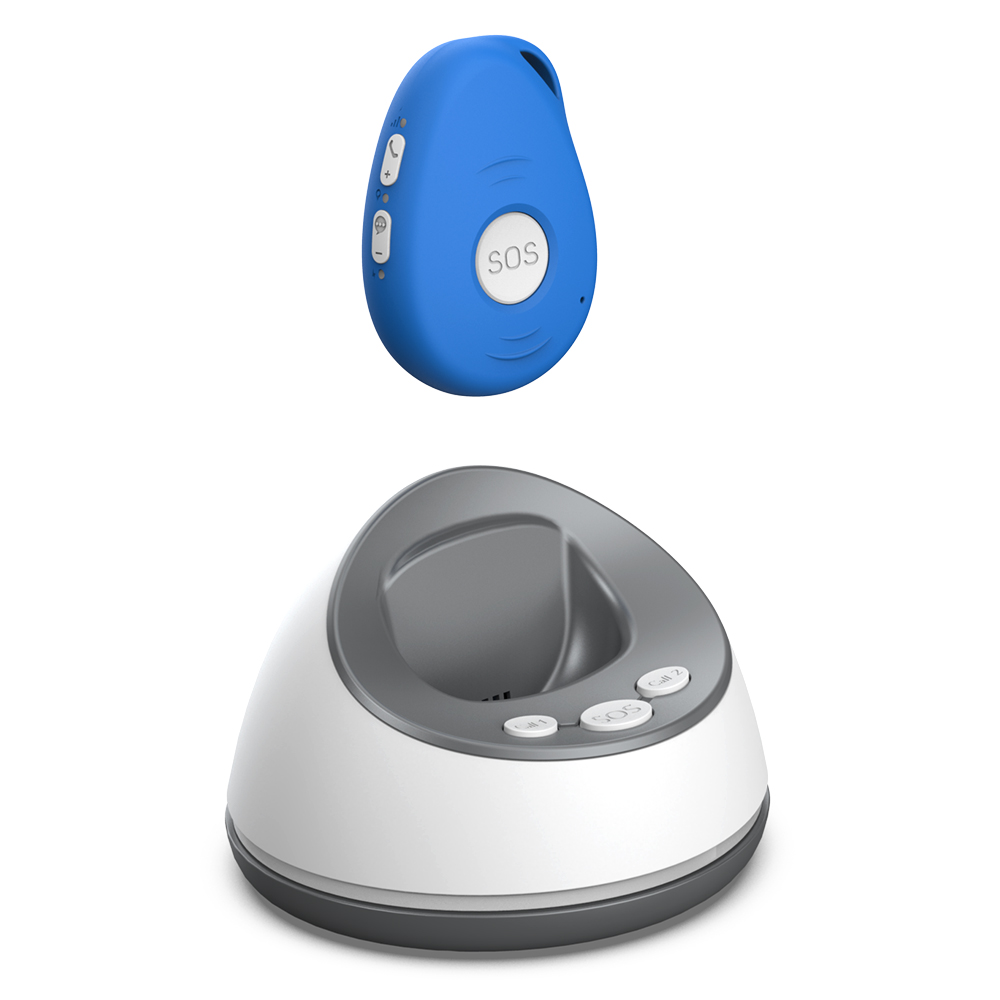
Some providers, like the FamilyR Medical Alarm personal medical alarm from Familyr, offer a device with no monthly fees. That kind of structure can make budgeting easier, especially for someone on a fixed income. It also means the alarm keeps working even if the user's financial situation changes, because there is no subscription to cancel. When you compare alarms, ask what happens after the first year and whether there are any hidden costs for things like replacement batteries or extra pendants.

Family involvement and monitoring options
Not every senior wants a central monitoring centre involved. Some prefer that an alarm simply calls a family member or a neighbour directly. Others want the reassurance of a professional response team that can dispatch an ambulance if needed. Compare what each service offers. Some alarms let you program multiple phone numbers, so the device will call a list of contacts in order until someone answers. Others use a dedicated monitoring centre that stays on the line until help arrives.
Two-way calling is a feature that can make a big difference. With two-way calling, the responder can talk to the wearer through the alarm's speaker, assess the situation, and decide what help is needed. That can reduce the number of unnecessary ambulance call-outs and also provide reassurance to the person waiting for help.
For family members who live far away, some alarms offer a companion app or a web portal that shows the wearer's location, battery level, and alarm history. That can give distant relatives a way to check in without calling every day. When comparing models, think about which features the family would actually use. A complicated app that nobody opens is not worth paying extra for.
Fall detection: a closer look
Automatic fall detection is often marketed as a must-have, but it is worth understanding its limits. The sensor inside a pendant or watch uses accelerometers and sometimes gyroscopes to detect the motion of a fall. It then analyses the impact and the angle of the device to decide whether a fall has occurred. If it decides yes, it starts the call process automatically.
No fall detection system is perfect. Sudden movements like dropping the device, a hard sneeze, or a stumble that the user catches themselves can trigger false alarms. On the other hand, a slow, controlled descent into a chair or a bed may not register as a fall at all. Some devices let you adjust the sensitivity, which can help reduce false alarms without losing real ones. When you compare alarms, ask whether the fall detection can be calibrated for the user's activity level.
Also consider that fall detection drains the battery faster because the sensors are always active. If the device uses replaceable batteries, the cost of frequent replacements adds up. If it uses a rechargeable battery, the user will need to charge it more often. Balance the benefit of automatic detection against the extra maintenance it requires.
Putting it all together
There is no single best personal alarm for every senior. The right choice depends on the person's lifestyle, health, and preferences. Someone who rarely leaves home and has a small house may be perfectly fine with a simple pendant that calls a family member. Someone who is still active, drives, and visits friends will benefit from a GPS model with fall detection and two-way calling.
When you compare alarms, make a list of the user's daily routines. Where do they spend most of their time? Do they live alone? Do they have a history of falls or balance problems? Are they comfortable with technology, or do they need something very simple? The answers will guide you toward the features that matter most.
For many seniors and their families, the FamilyR Medical Alarm personal medical alarm strikes a practical balance because it removes the worry of ongoing fees while still providing GPS tracking, two-way calling, and fall detection. But regardless of which brand you look at, the same comparison points apply: how it calls for help, where it works, how easy it is to use, and what it costs over time. Compare those things honestly, and you will find an alarm that fits the person who will wear it.